> ## Documentation Index
> Fetch the complete documentation index at: https://docs.humanintelligence.com/llms.txt
> Use this file to discover all available pages before exploring further.
# Connectors
> Access your governed people data from Claude, Notion Agents, and any other MCP-compatible tool.
Connectors are how you use your governed people data in the AI tools you already work in. Human Intelligence runs an MCP (Model Context Protocol) server that lets any compatible AI tool query your metrics, segments, and definitions — with your permissions enforced automatically.
You don't need to copy data, build reports, or switch between apps. Just ask a question from Claude, Notion Agents, or any MCP-compatible tool and get answers grounded in your governed data.
 **Integrations and connectors do different things.**
Integrations bring data into Human Intelligence from your people systems like your HRIS or ATS. Connectors do the opposite — they let you access your governed data from AI tools via MCP.
## Available connectors
Add Human Intelligence as a custom connector in Claude Desktop or claude.ai web — there's a one-click setup link. Ask questions like "What's engineering attrition this quarter?" and get answers grounded in your governed metrics and definitions.
Build Notion agents grounded in your people data. Pull live metrics into your
team's workspace and create automations that stay in sync with your governed
definitions.
Query your governed data over the Postgres wire protocol from Hex, Streamlit, psql, or any Postgres-compatible client. Governed metrics are available directly in SQL via `MEASURE()`.
Our MCP server is spec-compliant and works with any client that supports the Model Context Protocol — including internal agent harnesses your engineering team builds itself.
## What you'll need
Every connector points at the same place. Setting one up takes two values:
| Field | Value |
| -------------- | -------------------------------------------- |
| MCP Server URL | `https://chat.svc.humanintelligence.com/mcp` |
| Connector Name | `Human Intelligence` |
The connector name is just a display label — you can call it whatever you like. The URL is the same for every customer and every user; see [the MCP overview](/mcp/overview) for why.
## Setting up a connector
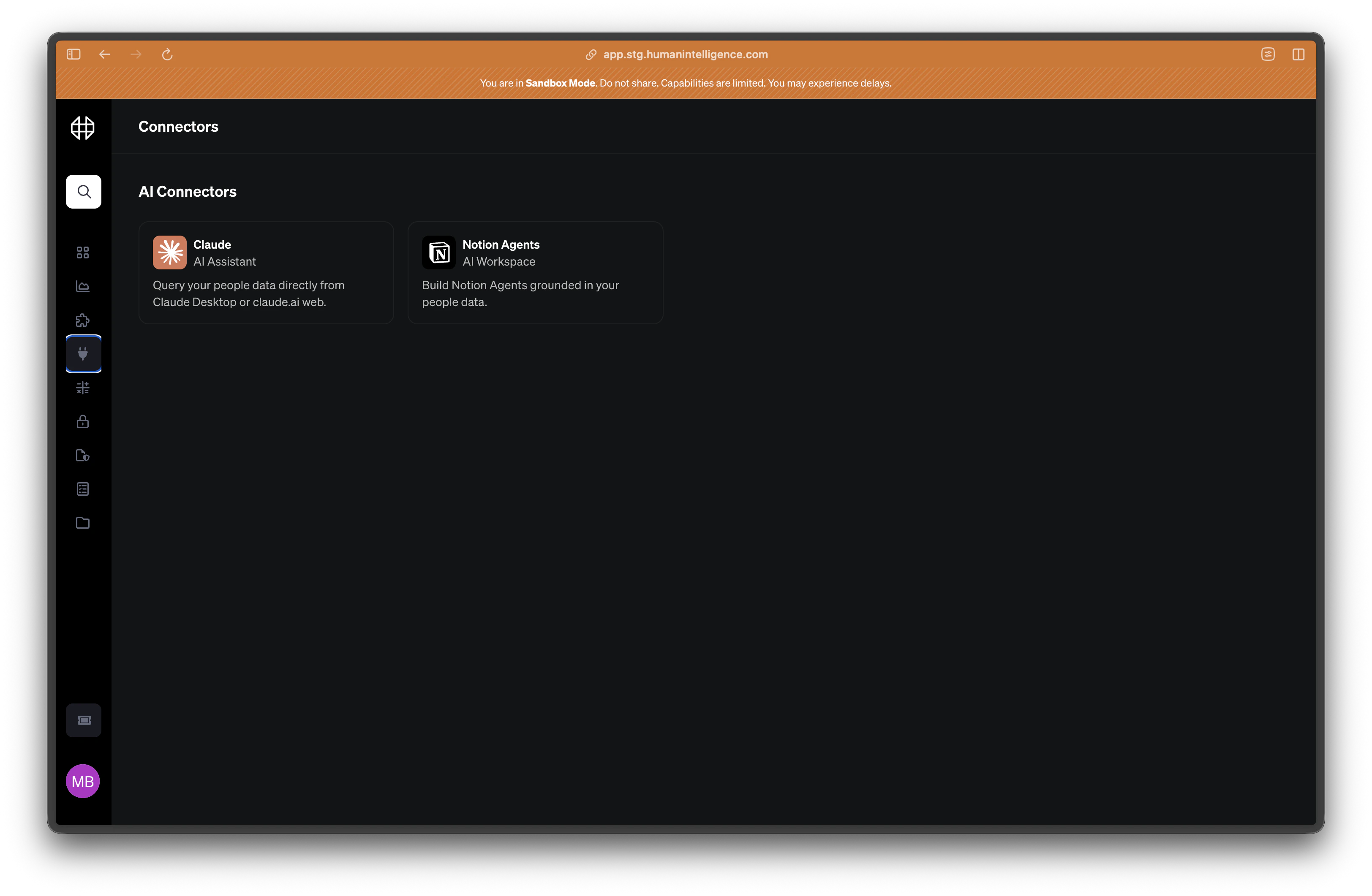
Open Human Intelligence and navigate to **Connectors** in the left sidebar. You'll see the available tools you can connect to.
Pick the AI tool you want to connect. Each connector page shows the MCP server
URL, the connector name, and the exact steps for that tool.
In your AI tool, add a custom MCP server or connector using the URL and name
above. The steps differ by tool — see the [Claude](/connectors/claude) and
[Notion Agents](/connectors/notion-agents) pages. Claude has a one-click setup
link that fills both fields in for you.
Your tool will open a Human Intelligence sign-in window. Sign in as you normally would, then click **Allow Access**. Your tool is now connected as you.
## What you can do
Once a connector is set up, you can work with your people data directly from your AI tool.
* **Ask questions about your people data.** "What's our attrition rate in engineering?" or "Show me headcount by department."
* **Get answers that use your governed definitions.** Every response is grounded in the metrics and definitions your team has set up in HI — not guesses or approximations.
* **Trust that permissions are enforced.** You only see the data you're allowed to see. Your access level in HI carries over to every connected tool.
For the full list of what a connected tool can do, see the [MCP tool reference](/mcp/tools).
Permissions carry over automatically. If someone doesn't have access to a
metric in Human Intelligence, they won't be able to see it through a connector
either. You don't need to manage permissions separately for each tool.
You can connect multiple AI tools at once. Your governance and permissions
apply everywhere.
**Integrations and connectors do different things.**
Integrations bring data into Human Intelligence from your people systems like your HRIS or ATS. Connectors do the opposite — they let you access your governed data from AI tools via MCP.
## Available connectors
Add Human Intelligence as a custom connector in Claude Desktop or claude.ai web — there's a one-click setup link. Ask questions like "What's engineering attrition this quarter?" and get answers grounded in your governed metrics and definitions.
Build Notion agents grounded in your people data. Pull live metrics into your
team's workspace and create automations that stay in sync with your governed
definitions.
Query your governed data over the Postgres wire protocol from Hex, Streamlit, psql, or any Postgres-compatible client. Governed metrics are available directly in SQL via `MEASURE()`.
Our MCP server is spec-compliant and works with any client that supports the Model Context Protocol — including internal agent harnesses your engineering team builds itself.
## What you'll need
Every connector points at the same place. Setting one up takes two values:
| Field | Value |
| -------------- | -------------------------------------------- |
| MCP Server URL | `https://chat.svc.humanintelligence.com/mcp` |
| Connector Name | `Human Intelligence` |
The connector name is just a display label — you can call it whatever you like. The URL is the same for every customer and every user; see [the MCP overview](/mcp/overview) for why.
## Setting up a connector
Open Human Intelligence and navigate to **Connectors** in the left sidebar. You'll see the available tools you can connect to.
Pick the AI tool you want to connect. Each connector page shows the MCP server
URL, the connector name, and the exact steps for that tool.
In your AI tool, add a custom MCP server or connector using the URL and name
above. The steps differ by tool — see the [Claude](/connectors/claude) and
[Notion Agents](/connectors/notion-agents) pages. Claude has a one-click setup
link that fills both fields in for you.
Your tool will open a Human Intelligence sign-in window. Sign in as you normally would, then click **Allow Access**. Your tool is now connected as you.
## What you can do
Once a connector is set up, you can work with your people data directly from your AI tool.
* **Ask questions about your people data.** "What's our attrition rate in engineering?" or "Show me headcount by department."
* **Get answers that use your governed definitions.** Every response is grounded in the metrics and definitions your team has set up in HI — not guesses or approximations.
* **Trust that permissions are enforced.** You only see the data you're allowed to see. Your access level in HI carries over to every connected tool.
For the full list of what a connected tool can do, see the [MCP tool reference](/mcp/tools).
Permissions carry over automatically. If someone doesn't have access to a
metric in Human Intelligence, they won't be able to see it through a connector
either. You don't need to manage permissions separately for each tool.
You can connect multiple AI tools at once. Your governance and permissions
apply everywhere.